
Job Search by ZipRecruiter
ZipRecruiter, Inc.Business
4.9145.03K Reviews
- Version
- 26.15.0
- Installs
- 10.00M
- Age Rating
- Everyone
Screenshots

Our Review of Job Search by ZipRecruiter
 Analysis by Appyee
I found Job Search by ZipRecruiter most useful when I treated it as a focused job-hunting workspace rather than a magic solution that replaces every other part of a search. The app is built for people who want to browse openings from a phone, react quickly when something suitable appears, and keep their search moving without sitting at a computer. In my experience, that mobile-first approach is its biggest strength: it reduces the distance between noticing an opportunity and deciding what to do next.
Developed by ZipRecruiter, Inc., this free Business app has a 4.9 average from around 489 thousand ratings and more than 10 million installs. Those figures suggest that it has become a familiar option for a large number of job seekers. It is rated for Everyone, and the current version is 26.11.0, with Android support starting at version 8.0. I would recommend it most readily to someone who wants a straightforward way to keep an eye on employment opportunities while commuting, taking a break, or managing a search alongside an existing job.
How the app feels during an everyday job search
When I use Job Search by ZipRecruiter in short bursts, I find it easier to stay consistent than to wait for a perfect block of free time. I try to give each visit one purpose—checking a particular kind of role, reading a promising listing, or deciding what to investigate next—so browsing does not become aimless. That routine also makes it easier to judge whether the app’s convenience is worth relying on as part of a broader search.
Fast enough for browsing, but your connection still matters
The first thing I noticed is that the app’s usefulness depends heavily on how quickly I can move through a list of relevant openings. A job search is rarely a single long session. More often, I check for a few minutes, dismiss roles that do not fit, open the promising ones, and return later. That makes perceived speed more important than having a visually elaborate interface. Job Search by ZipRecruiter suits this habit because its purpose is clear from the moment it opens: help me find work without turning the process into a full desktop-style research project.
On a strong connection, short browsing sessions feel natural. The experience is less comfortable when a search involves repeatedly loading new results, comparing several listings, or moving between details and the results screen. That is not unique to this app; job listings are content-heavy enough that network conditions can affect the whole process. My practical advice is to avoid judging the app after one slow session on weak mobile data. If the search is urgent, I would use a reliable connection and give myself enough time to read each listing rather than tapping through quickly.
The real speed advantage is reducing hesitation. When a role looks relevant, having a job-search tool already on the phone makes it easier to inspect it immediately instead of promising myself that I will remember it later. That matters because delayed applications can become forgotten applications. The app is therefore most effective for quick decisions and regular check-ins, not for replacing careful preparation.
What happens when I use it heavily
Longer sessions reveal a different side of the experience. Scrolling through many openings can become mentally tiring before it becomes technically difficult. The challenge is not simply finding jobs; it is keeping track of why a listing interested me, whether its requirements fit, and whether I have already considered something similar. I found that the app works better when I search with a clear target, such as a particular role, work arrangement, or area, instead of endlessly browsing.
For a concentrated search, I would divide the work into passes. In the first pass, I look for basic fit and remove obvious mismatches. In the second, I read the responsibilities and requirements more carefully. In the third, I decide whether the opportunity deserves an application or further research. This workflow prevents the phone format from encouraging shallow swiping. It also makes the app feel lighter because I am asking it to support a defined task rather than carry my entire job search in one sitting.
Heavy use can also expose the limits of a mobile interface. A phone is convenient for discovering openings, but it is not always the best place to compare several employers, edit a detailed résumé, or write a thoughtful response to a complicated application question. I prefer using the app to identify and prioritize opportunities, then switching to a larger screen when an application requires more concentration. That division of labor is one of the most useful ways to avoid frustration.
Reliability and recovering from interruptions
A job-search app has to fit around real life. I may be interrupted by a call, lose signal while traveling, lock the screen, or close the app after finding something worth revisiting. For that reason, reliability is not only about whether the app opens; it is also about whether my search remains manageable after I stop and return. Job Search by ZipRecruiter is easiest to use when I treat each visit as a small, organized task rather than assuming I can remember every listing I saw.
I recommend keeping a simple personal note with the role, employer, and next action whenever a listing seems important. That may sound old-fashioned, but it protects the search from the normal interruptions of mobile use. It also gives me a place to record questions about a position before I apply. The app can help me discover openings, but my own tracking system is still valuable when I am reviewing several possibilities at once.
Recovery is especially important after a session ends unexpectedly. Instead of trying to recreate every search from memory, I would begin with the most important job type and location, then narrow the results again. This is faster and safer than assuming that every previous result will be immediately visible. The lesson is not that the app is unreliable; it is that mobile job hunting benefits from a small amount of user organization.
Device requirements and practical constraints
Because the minimum Android requirement is version 8.0, the app is accessible to many people using older Android phones, although compatibility alone does not guarantee an equally smooth experience on every device. Hardware, available storage, background activity, and connection quality can all affect how comfortable browsing feels. I would be particularly cautious about expecting a budget or aging phone to handle long sessions as comfortably as a newer device.
Resource demands are best judged by the way you use it. Occasional searches and short checks are unlikely to feel demanding simply because the app is designed around a focused activity. A long session with many listings, repeated navigation, and other apps running in the background may feel less responsive on weaker hardware. If the phone already struggles with ordinary browsing, I would not choose a job-search app as the place to test its limits.
The screen size also changes the experience. A larger phone makes it easier to read responsibilities and qualifications without losing your place. On a compact display, I would slow down and avoid making application decisions based only on a quick glance. The app is convenient on nearly any supported phone, but convenience should not be confused with suitability for detailed document work.
Who benefits most from this approach?
I think the app is a strong fit for an active job seeker who wants frequent access to opportunities. It is especially practical for someone already employed, because short phone checks can fit around a workday better than repeated visits to a desktop site. It can also help a person who has just started searching and needs a central place to discover possibilities before deciding which employers or industries deserve deeper attention.
It is less suitable for someone who expects a single app to provide a complete career strategy. If I needed extensive résumé editing, portfolio presentation, networking, interview preparation, or detailed employer research, I would combine this app with other tools. A job board can surface possibilities, but it cannot decide whether a workplace matches my long-term goals or whether the responsibilities are worth accepting.
I would also be careful if I were applying indiscriminately. The convenience of mobile browsing can make it tempting to send applications simply because a title looks familiar. That approach creates noise and wastes time. The better use is selective: identify roles that genuinely match, inspect the details, and then prepare an application that reflects the position.
A realistic routine that works better than endless scrolling
Imagine I am looking for an administrative role while working another job. In the morning, I might spend a few minutes checking openings that match my experience. During lunch, I could read the most promising descriptions and remove positions with schedules or requirements that do not work for me. In the evening, I would return to the short list, compare the responsibilities, and prepare the strongest application on a larger screen if necessary.
This routine uses the app for what it does best: keeping the search close at hand and making discovery less dependent on a fixed location. It also prevents the phone from becoming a source of constant distraction. I do not need to browse every listing every time I open it. A defined purpose makes the experience faster, reduces decision fatigue, and helps me notice better opportunities instead of merely more opportunities.
A second useful scenario is a person who has recently changed industries. At first, the app can be used to learn how employers describe related roles and which requirements appear repeatedly. That does not replace professional research, but it can reveal the language used in real openings. I would use those observations to improve my résumé wording and identify skills that need strengthening, while still checking each employer independently before applying.
How it compares with ordinary alternatives
The usual alternative is searching through a web browser. A browser may be better when I want several tabs open, compare employer pages, or research a company while keeping the original listing visible. It can also be more comfortable for writing and editing. The app’s advantage is immediacy: it feels more like a dedicated place to check job opportunities than another tab among many.
Another alternative is relying on professional networking platforms. Those services can be stronger for contacts, industry conversations, and learning about a company through people. Job Search by ZipRecruiter is more direct when my immediate goal is to find openings rather than build a public professional presence. I would use both if networking mattered to my search, because they serve different purposes.
Local employment offices and employer career pages are also important alternatives. A direct company page may provide the most authoritative version of a vacancy, while a local service may offer guidance that a job board cannot. The app is most valuable as a discovery layer. Once I find a role that matters, I still want to verify the employer, understand the full expectations, and make sure the application route is appropriate.
Small habits that improve the results
My first tip is to search with specific intent. Broad searches produce a larger pile of listings, but a narrower search makes it easier to recognize useful matches. I would begin with the role I can realistically perform, then adjust one factor at a time. Changing the job title, location, or work preference all at once makes it harder to understand why the results changed.
My second tip is to read beyond the title. Job titles are not standardized, and two positions with similar names can involve very different schedules, responsibilities, or expectations. I use the title to open a listing, not to decide immediately that it is suitable. The details should determine whether it stays on my shortlist.
My third tip is to separate discovery from commitment. Finding a position in the app does not mean I have to apply instantly. I prefer to note what interests me, check whether my experience lines up, and prepare a tailored response. That extra step is a trade-off: it reduces the number of applications I can send quickly, but it improves the quality of the applications I do send.
My fourth tip is to protect attention during heavy browsing. I set a small goal for each session, such as reviewing a limited group of relevant listings or selecting a few roles for later action. This makes the app feel more responsive because I am not constantly loading and evaluating an unlimited stream. It also keeps the search from taking over the rest of the day.
What I would want a new user to understand first
The app is free to use and carries an Everyone age rating, so it is approachable for a broad audience. Its popularity is reflected in more than 143 thousand written reviews, but popularity should not be mistaken for a promise that every search will produce an ideal match. Employment searches depend on location, experience, timing, and the quality of the listings available to a particular person.
I would also install it with realistic expectations about performance. The app can make searching feel quicker because it puts opportunities in a convenient place, but it cannot make every listing load instantly or turn a weak connection into a strong one. On an older phone running the supported operating system, I would keep other demanding apps closed if browsing begins to feel sluggish. On a newer device, the greater benefit will probably be the reduced friction of checking opportunities wherever I am.
If I were choosing between this app and a browser, I would choose the app for regular monitoring and quick discovery. If I were preparing a complex application, comparing several employers, or editing documents, I would move to a browser or computer. That is not a weakness unique to Job Search by ZipRecruiter; it is the natural boundary between mobile discovery and detailed application work.
My final performance verdict
After using it as a practical job-search companion, I see Job Search by ZipRecruiter as a convenient and focused option for keeping employment opportunities within reach. Its perceived speed is strongest during short, purposeful sessions. Its stability is easiest to appreciate when I keep my searches organized and avoid treating the phone as a complete replacement for every other job-hunting tool. Device age and connection quality still matter, especially during extended browsing.
The app’s most important strength is not that it eliminates effort. It makes the early, repetitive part of a search easier to fit into everyday life. I can check possibilities when I have a spare moment, identify roles worth serious attention, and return to the larger tasks with a clearer shortlist. That workflow feels more realistic than expecting one sitting to solve everything.
My recommendation is simple: use it to stay alert, not to apply blindly. It is a good choice for people who want a free mobile route into job discovery, particularly those who value quick checks and regular access. I would pair it with careful employer research, a well-prepared résumé, and a larger screen when an application demands detail. With that balance, the app earns its place as a useful part of a serious job search rather than an unrealistic all-in-one answer.
Job Search by ZipRecruiter has been available since Jul 7, 2014, and the current release is version 26.11.0. Those details matter mainly because they show that the app is an established tool rather than a new experiment. For my needs, its best role is clear: a dependable starting point for finding relevant openings, with the final judgment and preparation still firmly in my hands.
Privacy and Permissions
See what permissions an app requests and how it handles your data.
- Location
- approximate location (network-based)
- Photos/Media/Files
- read the contents of your USB storage, modify or delete the contents of your USB storage
- Storage
- read the contents of your USB storage, modify or delete the contents of your USB storage
- Camera
- take pictures and videos
- Microphone
- record audio
- Other
- view network connections, full network access, change your audio settings, run at startup, prevent device from sleeping
Verdict
Strengths of Job Search by ZipRecruiter
- Simple profile setup and resume upload process
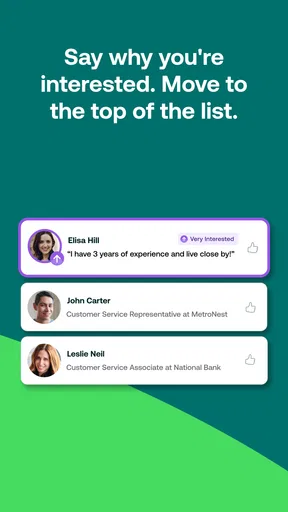
- Personalized job recommendations improve search efficiency
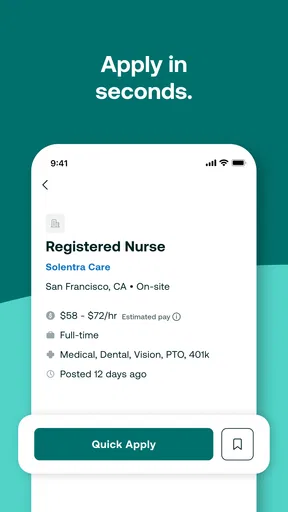
- One-tap applications save time during the job hunt
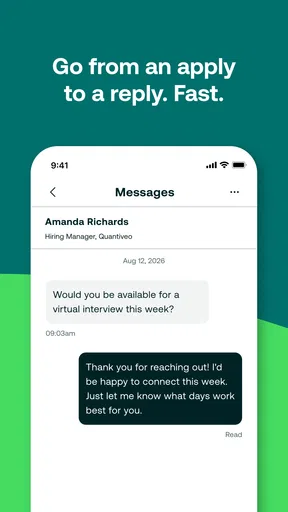
- Employer messaging keeps communication in one place
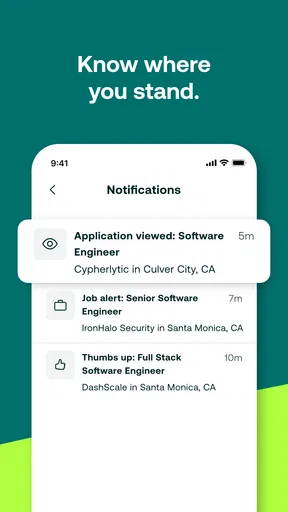
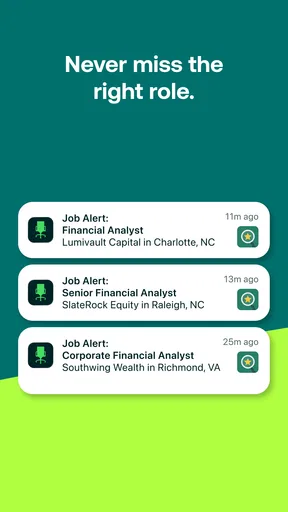
- Job alerts help users respond quickly to new listings
Limitations of Job Search by ZipRecruiter
- Some listings may appear repeatedly in search results
- Application requirements vary widely between employers
- Certain jobs redirect applicants to external websites
- Recommendation quality depends on your profile details
- The app can send frequent notifications without careful settings
Similar Picks in This Category
View All
LinkedIn: Community & Network
LinkedIn3.8

Zoom Workplace
zoom.com4.1

Microsoft Teams
Microsoft Corporation4.6

Meta Business Suite
Meta Platforms, Inc.4.6

Webex Meetings
Cisco Systems, Inc.4.5

TeamViewer Remote Control
TeamViewer4.4
Frequently Asked Questions
What is Job Search by ZipRecruiter?
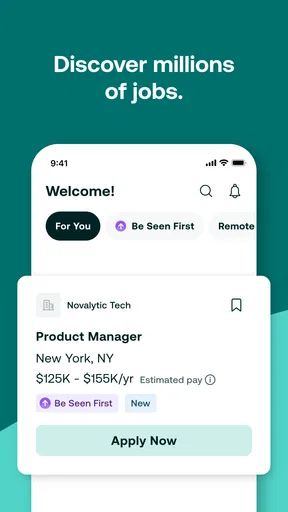
Job Search by ZipRecruiter is a mobile employment app that helps you discover vacancies, review job descriptions, and apply from your Android or iOS device. It uses your search terms, location, experience, and preferences to display potentially relevant opportunities. You can browse listings across different industries, save interesting positions, and manage applications without needing to visit the ZipRecruiter website every time.
How do I search and apply for jobs with ZipRecruiter?
After creating or signing in to a ZipRecruiter account, you can enter a job title, skill, company, or location and refine the results with available filters. Opening a listing shows its responsibilities, requirements, workplace details, and application instructions. Depending on the employer, you may apply using your saved profile and résumé, complete an external application, or provide additional information requested by the company.
Is Job Search by ZipRecruiter free to download and use?
The Job Search by ZipRecruiter app is generally free for job seekers to download and use. Searching for vacancies, viewing listings, saving jobs, and receiving many job alerts do not normally require a paid subscription. However, some applications may redirect you to an employer’s website, where that company controls the process. Always avoid services that ask applicants for payment to be considered for a job.
Can ZipRecruiter send personalized job recommendations and alerts?
Yes. ZipRecruiter can provide job recommendations and notifications based on your profile, searches, résumé, location, and activity within the app. These suggestions can save time when you are applying regularly, but they may not always be a perfect match. It is worth reviewing your preferences and notification settings, and checking each listing carefully for salary, location, schedule, and qualification details.
Is it safe to apply for jobs through the ZipRecruiter app?
ZipRecruiter provides a convenient platform for connecting job seekers with employers, but users should still evaluate every opportunity independently. Before sharing sensitive information, verify the company, recruiter, email address, and application website. Be cautious of requests for money, banking credentials, gift cards, or identity documents before a legitimate hiring process. Use the app’s reporting options if a listing appears suspicious or misleading.
